
Blog
Mobile Application Development BSCS Term 8th Past Paper 2018 UOS
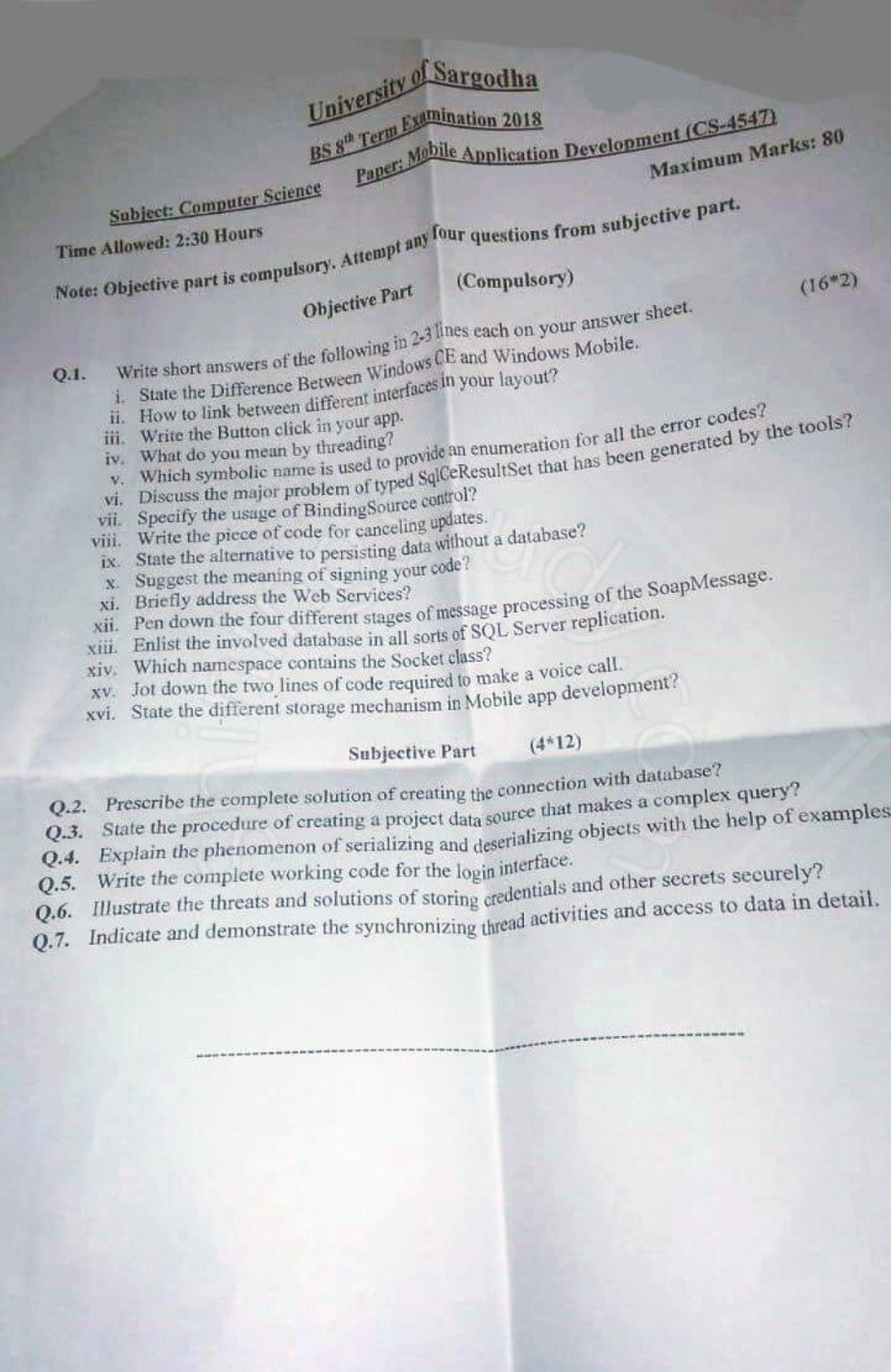
University of Sargodha
BS 8th Term Examination 2018
Subject: Computer Science
Paper: Mobile Application Development (CS-4547)
Maximum Marks: 80
Time Allowed: 2.30 Hours
Note: Objective part is compulsory. Attempt any four questions from subjective part.
Objective Part (Compulsory) (16*2)
Q.1. Write short answers of the following in 2-3 lines each on your answer sheet. i. State the Difference Between Windows CE and Windows Mobile?
ii. How to link between different interfaces in your layout?
iii. Write the Button click in your app.
iv. What do you mean by threading?
v. Which symbolic name is used to provide an enumeration for all the error codes?
vi. Discuss the major problem of typed SqlCeResultSet that has been generated by the tools?
vii. Specify the usage of BindingSource control?
viii. Write the piece of code for canceling updates.
ix. State the alternative to persisting data without a database?
x. Suggest the meaning of signing your code?
xi. Briefly address the Web Services?
xii. Pen down the four different stages of message processing of the SoapMessage.
xiii. Enlist the involved database in all sorts of SQL Server replication?
xiv. Which namespace contains the Socket class?
xv. Jot down the two lines of code required to make a voice call.
xvi. State the different storage mechanism in Mobile app development?
Subjective Part (4*12)
Q.2. Prescribe the complete solution of creating the connection with database?
Q.3. State the procedure of creating a project data source that makes a complex query?
Q.4. Explain the phenomenon of serializing and deserializing objects with the help of examples?
Q.5. Write the complete working code for the login interface.
Q.6. Illustrate the threats and solutions of storing credentials and other secrets securely?
Q.7. Indicate and demonstrate the synchronizing thread activities and access to data in detail.
Solved answers
This paper is based on Windows Mobile development with the .NET Compact Framework (C#) and SQL Server Compact (SqlCe); answers follow that platform.
Q1 – Short questions
(i) Windows CE vs Windows Mobile: Windows CE is a modular, real-time embedded operating system that manufacturers customise for many devices (industrial controllers, kiosks, GPS units). Windows Mobile is a complete platform built on Windows CE for smartphones and PDAs, with a standard shell, phone features, Pocket Office and fixed APIs.
(ii) Linking interfaces: each screen is a form (or Activity/ViewController on other platforms); from a button’s event handler create and show the next form, e.g. new DetailsForm().ShowDialog();, passing data through the constructor or properties, and close it to return.
(iii) Button click: button1.Click += new EventHandler(button1_Click); private void button1_Click(object sender, EventArgs e) { MessageBox.Show("Clicked"); }
(iv) Threading: running multiple paths of execution at the same time in one application, so long tasks (network calls, database work) run on background threads while the UI thread stays responsive (System.Threading.Thread, ThreadPool, Timer).
(v) The SocketError enumeration (System.Net.Sockets) gives symbolic names for all socket error codes (e.g. ConnectionRefused, TimedOut); exceptions expose them through SocketException.SocketErrorCode. For SQL CE, errors are reported through SqlCeException.Errors with NativeError codes.
(vi) Typed SqlCeResultSet problem: the class generated by Visual Studio hard-codes the connection string (the database file path used at design time). When the app is deployed and the .sdf file is in a different location, the result set fails to open; also, regenerating the class overwrites any custom changes. The fix is to pass the connection string at run time or edit it in the partial class.
(vii) BindingSource: a component that sits between data (DataSet, DataTable, list, result set) and controls; it simplifies data binding, provides currency (current record), navigation (MoveNext), sorting/filtering, and change notification to bound controls.
(viii) Cancelling updates: bindingSource1.CancelEdit(); discards changes to the current row; dataSet1.RejectChanges(); rolls back all uncommitted changes.
(ix) Persisting without a database: save data in XML files (XmlSerializer/DataSet.WriteXml), plain text/binary files, the device registry, or application settings files.
(x) Signing code: applying a digital signature with a certificate to the assembly/CAB file, proving the publisher’s identity and that the code has not been changed; on Windows Mobile signed (privileged) code can access protected APIs and installs without security warnings.
(xi) Web services: components exposed over HTTP using SOAP/XML (described by WSDL) that a mobile app can call to exchange data with servers; in .NET CF you add a Web Reference and call the generated proxy methods (synchronously or asynchronously).
(xii) SoapMessage stages: BeforeSerialize, AfterSerialize, BeforeDeserialize, AfterDeserialize (SoapMessageStage enumeration), used by SOAP extensions to inspect or modify messages.
(xiii) Databases in SQL Server replication: the Publisher (source database), the Distributor (stores replication metadata/history) and the Subscriber (receives the data – e.g. SQL CE on the device in merge replication).
(xiv) System.Net.Sockets.
(xv) Voice call: Microsoft.WindowsMobile.Telephony.Phone phone = new Phone(); phone.Talk("03001234567");
(xvi) Storage mechanisms: SQL Server Compact database, files (text/binary/XML), the registry, application settings, storage cards, and remote storage through web services/sync.
Q2 – Creating a connection with the database (SQL Server Compact)
- Add a reference to
System.Data.SqlServerCeand create/add the .sdf database file to the project (Copy to Output Directory). - Build the connection string with the database path (and password if encrypted).
- Open the connection inside try/catch/using, execute commands, then close.
using System.Data.SqlServerCe;
using System.IO;
using System.Reflection;

string appDir = Path.GetDirectoryName(Assembly.GetExecutingAssembly().GetName().CodeBase);
string connStr = "Data Source=" + Path.Combine(appDir, "Store.sdf") + ";Password=myPass;";

using (SqlCeConnection conn = new SqlCeConnection(connStr))
{
    try
    {
        conn.Open();
        SqlCeCommand cmd = new SqlCeCommand("SELECT Name, Price FROM Products WHERE Price > @p", conn);
        cmd.Parameters.AddWithValue("@p", 500);
        using (SqlCeDataReader rd = cmd.ExecuteReader())
        {
            while (rd.Read())
                listBox1.Items.Add(rd.GetString(0) + " - " + rd.GetDecimal(1));
        }
    }
    catch (SqlCeException ex)
    {
        MessageBox.Show("Database error: " + ex.Message);
    }
}   // connection is closed automatically
To create the database at run time if it does not exist: new SqlCeEngine(connStr).CreateDatabase();
Q3 – Project data source with a complex query
- Data menu → Add New Data Source → choose Database → select or create a connection to the .sdf file → save the connection string.
- Choose the tables/columns to create a typed DataSet with TableAdapters.
- Open the DataSet designer (.xsd), right-click the TableAdapter → Add Query → “Use SQL statements” → “SELECT which returns rows”.
- Write or build (Query Builder) the complex query, e.g. joins, conditions and parameters:
SELECT o.OrderID, c.Name, SUM(d.Qty*d.Price) AS Total FROM Orders o INNER JOIN Customers c ON o.CustID = c.CustID INNER JOIN OrderDetails d ON o.OrderID = d.OrderID WHERE o.OrderDate BETWEEN @from AND @to GROUP BY o.OrderID, c.Name. - Name the methods (FillByDateRange / GetDataByDateRange) and finish.
- Drag the data source onto a form to create a DataGrid with BindingSource, then call
ordersTableAdapter.FillByDateRange(dataSet.Orders, fromDate, toDate);
Q4 – Serialization and deserialization
Serialization converts an object’s state into a format (XML or binary) that can be stored in a file or sent over a network; deserialization rebuilds the object from that data. Used for saving settings, offline data and web-service messages. (.NET CF supports XmlSerializer.)
public class Student            // public class with public properties
{
    public int RollNo { get; set; }
    public string Name { get; set; }
    public double CGPA { get; set; }
}

// Serialize to XML file
Student s = new Student { RollNo = 21, Name = "Ayesha", CGPA = 3.6 };
XmlSerializer xs = new XmlSerializer(typeof(Student));
using (StreamWriter w = new StreamWriter(@"\My Documents\student.xml"))
    xs.Serialize(w, s);

// Deserialize back to an object
using (StreamReader r = new StreamReader(@"\My Documents\student.xml"))
{
    Student s2 = (Student)xs.Deserialize(r);
    MessageBox.Show(s2.Name + " " + s2.CGPA);
}
The file contains <Student><RollNo>21</RollNo><Name>Ayesha</Name><CGPA>3.6</CGPA></Student>.
Q5 – Login interface (complete code)
using System;
using System.Data.SqlServerCe;
using System.Security.Cryptography;
using System.Text;
using System.Windows.Forms;

public class LoginForm : Form
{
    TextBox txtUser = new TextBox();
    TextBox txtPass = new TextBox();
    Button btnLogin = new Button();
    Label lblMsg = new Label();
    const string ConnStr = @"Data Source=\Program Files\MyApp\App.sdf";

    public LoginForm()
    {
        Text = "Login";
        txtUser.SetBounds(20, 20, 200, 24);
        txtPass.SetBounds(20, 55, 200, 24);
        txtPass.PasswordChar = '*';
        btnLogin.Text = "Login";
        btnLogin.SetBounds(20, 90, 90, 28);
        lblMsg.SetBounds(20, 125, 220, 24);
        btnLogin.Click += new EventHandler(btnLogin_Click);
        Controls.Add(txtUser); Controls.Add(txtPass);
        Controls.Add(btnLogin); Controls.Add(lblMsg);
    }

    static string Hash(string text)
    {
        SHA1 sha = new SHA1CryptoServiceProvider();
        return Convert.ToBase64String(sha.ComputeHash(Encoding.UTF8.GetBytes(text)));
    }

    void btnLogin_Click(object sender, EventArgs e)
    {
        if (txtUser.Text.Trim() == "" || txtPass.Text == "")
        {
            lblMsg.Text = "Enter username and password";
            return;
        }
        using (SqlCeConnection conn = new SqlCeConnection(ConnStr))
        {
            conn.Open();
            SqlCeCommand cmd = new SqlCeCommand(
                "SELECT COUNT(*) FROM Users WHERE UserName = @u AND PasswordHash = @p", conn);
            cmd.Parameters.AddWithValue("@u", txtUser.Text.Trim());
            cmd.Parameters.AddWithValue("@p", Hash(txtPass.Text));
            int found = (int)cmd.ExecuteScalar();
            if (found == 1)
            {
                new MainForm().Show();     // open the main screen
                this.Hide();
            }
            else
            {
                lblMsg.Text = "Invalid username or password";
                txtPass.Text = "";
            }
        }
    }
}
Parameters prevent SQL injection and the password is compared as a hash, not plain text.
Q6 – Storing credentials and secrets securely
Threats: devices are easily lost or stolen, so data stored on them can be read; passwords, connection strings or API keys hard-coded in the app can be extracted by decompiling the assembly; plain-text config files, registry values or unencrypted databases expose secrets; data sent over the network can be intercepted; other applications or malware on the device may read shared storage; weak passwords allow brute-force attacks.
Solutions:
- Never hard-code secrets in source code; obtain tokens from the server after login.
- Store user passwords only as salted hashes (SHA-256), never in plain text.
- Encrypt secrets with the Data Protection API (CryptProtectData/CryptUnprotectData) or System.Security.Cryptography (AES) using keys protected by the OS.
- Encrypt the SQL CE database (password + encrypt option) and use the device’s storage-card encryption.
- Use SSL/HTTPS for all network communication and validate certificates.
- Enforce device lock/PIN policies and remote wipe (Exchange ActiveSync policies).
- Obfuscate and sign the code; apply least privilege and clear sensitive data from memory after use.
Q7 – Synchronizing thread activities and data access
When several threads use the same data, race conditions can corrupt it, so access must be synchronized. Also, only the UI thread may update controls.
- lock / Monitor: allows only one thread at a time into a critical section.
- Mutex: like lock but can work across processes.
- AutoResetEvent / ManualResetEvent: one thread waits until another signals that work is done.
- Interlocked: atomic increment/decrement for simple counters.
- Control.Invoke: marshals a call from a worker thread to the UI thread.
public partial class MainForm : Form
{
    private readonly object sync = new object();
    private int totalDownloaded = 0;
    private AutoResetEvent done = new AutoResetEvent(false);

    void StartWork()
    {
        for (int i = 0; i < 3; i++)
            new Thread(new ThreadStart(Download)).Start();
    }

    void Download()
    {
        int bytes = FetchChunk();             // long-running work on a background thread
        lock (sync)                           // only one thread updates shared data at a time
        {
            totalDownloaded += bytes;
        }
        // update UI safely from the worker thread
        this.Invoke(new EventHandler(UpdateLabel));
        done.Set();                           // signal that one chunk finished
    }

    void UpdateLabel(object sender, EventArgs e)
    {
        lblStatus.Text = "Downloaded: " + totalDownloaded + " bytes";
    }
}
Without the lock, two threads could read the same old value and one update would be lost; without Invoke, touching the label from a worker thread raises an exception.
Answers prepared by Shining Study for revision. Check them against your class notes and teacher’s guidance.