
Blog
Database Administration MSc IT 4th Term 2018 Past Paper UOS
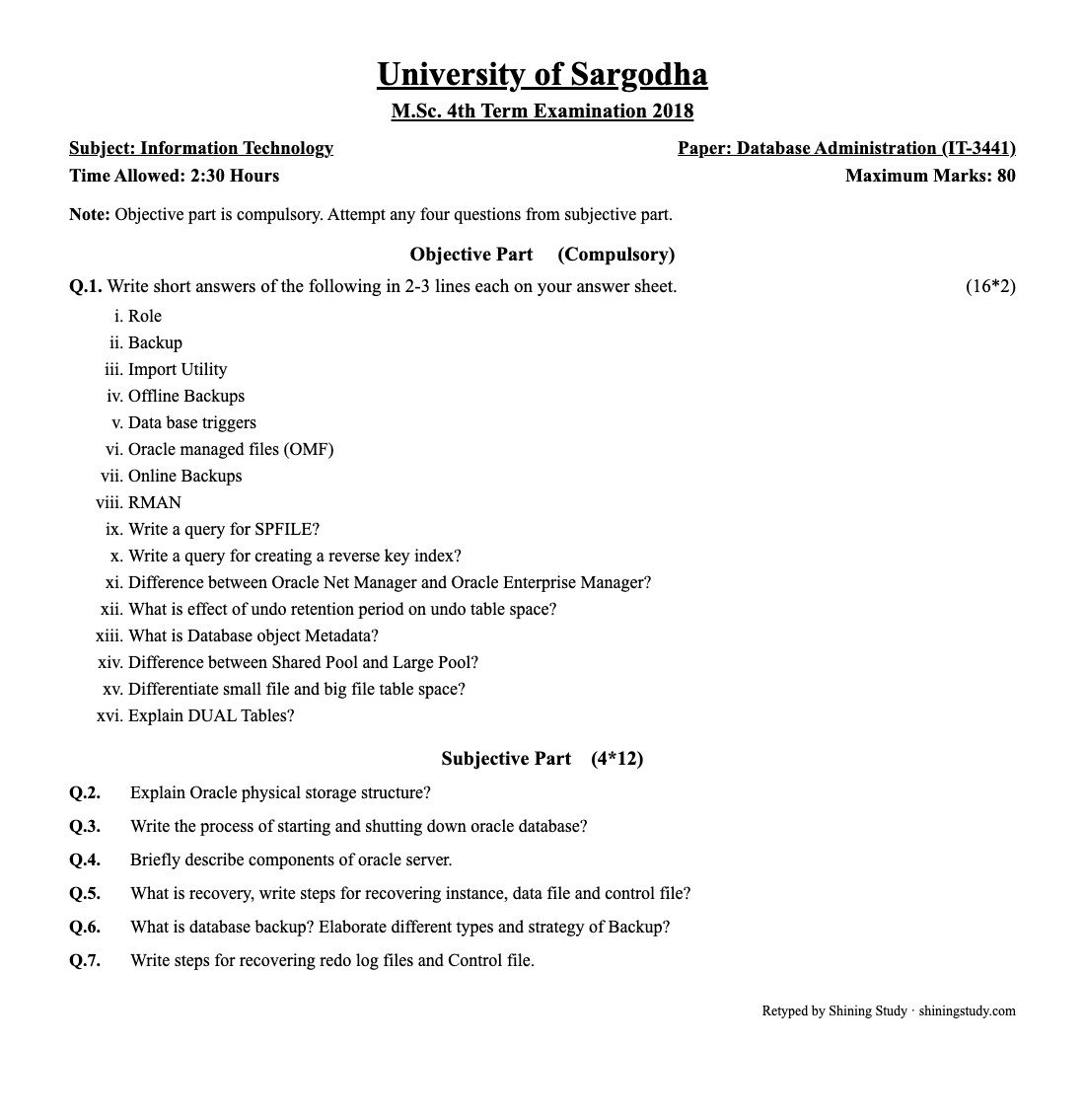
University of Sargodha (UOS) M.Sc. IT 4th term Database Administration (IT-3441) past paper 2018, with the full question paper and solved answers on Oracle backup, recovery, storage and startup.
Database Administration Past Paper 2018 (text version)
University of Sargodha – M.Sc. 4th Term Examination 2018, Information Technology
Paper: Database Administration (IT-3441) · Time: 2:30 Hours · Maximum marks: 80
Note: Objective part is compulsory. Attempt any four questions from subjective part.
Objective part (compulsory) (16*2)
- Role
- Backup
- Import Utility
- Offline Backups
- Data base triggers
- Oracle managed files (OMF)
- Online Backups
- RMAN
- Write a query for SPFILE?
- Write a query for creating a reverse key index?
- Difference between Oracle Net Manager and Oracle Enterprise Manager?
- What is effect of undo retention period on undo table space?
- What is Database object Metadata?
- Difference between Shared Pool and Large Pool?
- Differentiate small file and big file table space?
- Explain DUAL Tables?
Subjective part (4*12)
- Q.2 Explain Oracle physical storage structure?
- Q.3 Write the process of starting and shutting down oracle database?
- Q.4 Briefly describe components of oracle server.
- Q.5 What is recovery, write steps for recovering instance, data file and control file?
- Q.6 What is database backup? Elaborate different types and strategy of Backup?
- Q.7 Write steps for recovering redo log files and Control file.
Solved answers – Database Administration 2018
Short questions
- Role: a named group of privileges that can be granted to users or other roles, making privilege management easier – e.g.
CREATE ROLE clerk; GRANT SELECT ON emp TO clerk; GRANT clerk TO ali;Built-in roles include CONNECT, RESOURCE and DBA. - Backup: a copy of database data (datafiles, control files, archived redo logs, SPFILE) kept so the database can be restored and recovered after media failure, user error or corruption. Backups are physical (RMAN, OS copies) or logical (Data Pump export).
- Import utility: a logical-backup tool that reads a dump file created by Export and loads its objects and rows into a database. In 10g and later it is Data Pump Import (
impdp), e.g.impdp hr/pw DIRECTORY=dp_dir DUMPFILE=hr.dmp. - Offline (cold/consistent) backup: taken after a clean shutdown (SHUTDOWN NORMAL/IMMEDIATE/TRANSACTIONAL) by copying all datafiles, control files and redo logs. The database is unavailable during the backup, but the backup is consistent and can be restored without recovery.
- Database trigger: a stored PL/SQL block that runs automatically when an event occurs – DML on a table (INSERT/UPDATE/DELETE), DDL, or database events such as LOGON, STARTUP and SHUTDOWN. Used for auditing, enforcing complex rules and deriving values.
- Oracle Managed Files (OMF): Oracle automatically creates, names and deletes operating-system files for datafiles, tempfiles, redo logs and control files in locations set by
DB_CREATE_FILE_DESTandDB_CREATE_ONLINE_LOG_DEST_n, so the DBA does not specify file names. - Online (hot/inconsistent) backup: taken while the database is open and in use. It requires ARCHIVELOG mode; the backup is inconsistent and archived redo logs are applied during recovery to make it consistent. Taken with RMAN or
ALTER TABLESPACE … BEGIN/END BACKUP. - RMAN (Recovery Manager): Oracle’s built-in tool for backup, restore and recovery. It takes block-level, incremental and compressed backups, validates blocks for corruption, tracks backups in the control file or a recovery catalog, and automates recovery, e.g.
RMAN> BACKUP DATABASE PLUS ARCHIVELOG; CREATE SPFILE FROM PFILE;(orCREATE PFILE FROM SPFILE;). To check which one is used:SHOW PARAMETER spfile;and to change a value:ALTER SYSTEM SET processes=300 SCOPE=SPFILE;CREATE INDEX emp_id_rev ON emp(emp_id) REVERSE;– the key bytes are stored reversed, spreading sequential values across leaf blocks to reduce contention.- Oracle Net Manager is a client/server tool for configuring network files (listener.ora, tnsnames.ora, sqlnet.ora). Oracle Enterprise Manager is a web-based console for administering and monitoring whole databases – storage, users, performance, backups and jobs.
UNDO_RETENTIONsets how long (seconds) committed undo is kept. A longer period supports long queries and Flashback (fewer ORA-01555 “snapshot too old” errors) but needs a bigger undo tablespace; with autoextend Oracle grows the tablespace, and with RETENTION GUARANTEE it never overwrites unexpired undo even if DML fails.- Database object metadata: “data about data” – the definitions of objects (tables, columns, data types, constraints, indexes, owners, privileges) stored in the data dictionary and viewed through USER_/ALL_/DBA_ views or
DBMS_METADATA.GET_DDL. - Shared pool caches parsed SQL/PL/SQL (library cache) and dictionary data so statements can be reused. Large pool is an optional area for large allocations – RMAN I/O buffers, shared-server session memory and parallel-query messages – keeping them out of the shared pool.
- Smallfile tablespace (default) can have up to 1022 datafiles, each up to 4 million blocks (32 GB with 8 KB blocks). Bigfile tablespace has exactly one very large datafile (up to 4 billion blocks, 32 TB with 8 KB blocks), simplifying management of huge databases.
- DUAL is a one-row, one-column table owned by SYS, used to select expressions or functions that need no real table:
SELECT SYSDATE FROM dual;
Subjective questions
Q.2
Oracle physical storage structure – the operating-system files that make up the database:
- Datafiles – hold all table, index and other data; each belongs to one tablespace.
- Control files – small binary files recording the database name, file locations, SCN and checkpoint and backup information; should be multiplexed.
- Online redo log files – record every change, organized in groups of multiplexed members written by LGWR in a circular way.
- Archived redo logs – copies of filled redo logs (ARCHIVELOG mode) for media recovery.
- Parameter file (SPFILE/PFILE), password file, alert log and trace files, and tempfiles for temporary tablespaces.
Logically these map to tablespaces → segments → extents → Oracle blocks, and each Oracle block is made of one or more OS blocks.
Q.3
Starting up (as SYSDBA) goes through three stages:
STARTUP NOMOUNT– reads the SPFILE/PFILE, allocates the SGA and starts background processes (instance started). Used to create a database or restore control files.ALTER DATABASE MOUNT– opens the control files and locates datafiles and redo logs. Used for renaming files, enabling ARCHIVELOG and full recovery.ALTER DATABASE OPEN– opens datafiles and redo logs; users can connect. PlainSTARTUPdoes all three; options include STARTUP RESTRICT, STARTUP FORCE and STARTUP PFILE=….
Shutting down:
SHUTDOWN NORMAL– waits for all users to disconnect.SHUTDOWN TRANSACTIONAL– waits for current transactions to finish.SHUTDOWN IMMEDIATE– rolls back active transactions and disconnects users (most common).SHUTDOWN ABORT– stops instantly; instance recovery is needed at next startup.
The first three give a clean, consistent shutdown; stages are reversed: close → dismount → instance shut down.
Q.4
Components of Oracle server: an Oracle server = Oracle instance + Oracle database.
- Instance – memory: the SGA (shared pool with library and data-dictionary cache, database buffer cache, redo log buffer, large pool, Java pool, Streams pool) and the PGA for each server process.
- Instance – background processes: DBWn, LGWR, CKPT, SMON, PMON, ARCn, RECO, MMON and others.
- Database – physical files: datafiles (data), control files (database structure and status), online redo log files (all changes); plus parameter file (SPFILE/PFILE), password file, archived logs and alert/trace files.
- Logical structure: tablespaces → segments → extents → data blocks.
- Processes for users: user process (client) and server process (dedicated or shared) that does the work on the user’s behalf; the listener accepts network connections.
Q.5
Recovery restores the database to a consistent, usable state after a failure by restoring backups and applying redo (roll forward) and undo (roll back).
- Instance recovery (after a crash or SHUTDOWN ABORT) is automatic: just
STARTUP. SMON rolls forward the online redo logs from the last checkpoint and rolls back uncommitted transactions using undo. - Datafile recovery (ARCHIVELOG mode): take the file offline –
ALTER DATABASE DATAFILE 5 OFFLINE;– then in RMANRESTORE DATAFILE 5; RECOVER DATAFILE 5;and bring it online withALTER DATABASE DATAFILE 5 ONLINE;(for SYSTEM/UNDO files, do this in MOUNT state). - Control file recovery: if one multiplexed copy is lost, shut down, copy a surviving copy over it (or edit CONTROL_FILES) and start up. If all are lost:
STARTUP NOMOUNT; RESTORE CONTROLFILE FROM AUTOBACKUP; ALTER DATABASE MOUNT; RECOVER DATABASE; ALTER DATABASE OPEN RESETLOGS;(or recreate it with CREATE CONTROLFILE from a trace backup).
Q.6
Database backup is a copy of the database used to reconstruct it after loss. Types:
- Physical vs logical: copies of datafiles, control files and archived logs (RMAN, user-managed) vs export of objects and rows (Data Pump).
- Consistent (offline/cold) vs inconsistent (online/hot): taken after a clean shutdown vs while open in ARCHIVELOG mode.
- Whole vs partial: entire database vs selected tablespaces or datafiles.
- Full vs incremental: every used block vs only blocks changed since a previous backup – level 0 (base) and level 1 (differential or cumulative).
- Backup sets vs image copies in RMAN.
Strategy: run in ARCHIVELOG mode; take a weekly level 0 and daily level 1 incremental backups; back up archived logs and an autobackup of the control file and SPFILE; keep backups in the Fast Recovery Area and on separate media/off-site; set a retention policy; multiplex control files and redo logs; and regularly test restores with RESTORE … VALIDATE.
Q.7
Recovering online redo log files:
- One member of a multiplexed group lost: the instance keeps running; drop and re-add the member:
ALTER DATABASE DROP LOGFILE MEMBER '/u01/redo01b.log'; ALTER DATABASE ADD LOGFILE MEMBER '/u01/redo01b.log' TO GROUP 1; - Whole INACTIVE group lost:
ALTER DATABASE CLEAR LOGFILE GROUP 2;(use CLEAR UNARCHIVED LOGFILE if it was not archived, then take a new full backup). - CURRENT or ACTIVE group lost: restore the database and perform incomplete recovery up to the last available log:
RESTORE DATABASE; RECOVER DATABASE UNTIL CANCEL; ALTER DATABASE OPEN RESETLOGS;
Recovering the control file: if one copy is lost, copy a good multiplexed copy over it and restart. If all are lost: STARTUP NOMOUNT; → RESTORE CONTROLFILE FROM AUTOBACKUP; → ALTER DATABASE MOUNT; → RECOVER DATABASE; → ALTER DATABASE OPEN RESETLOGS; Alternatively recreate it with the script from ALTER DATABASE BACKUP CONTROLFILE TO TRACE.
Answers prepared by Shining Study for revision. Check them against your class notes and teacher’s guidance.