
Blog
Database Administration and Management MSc IT 4th 2016
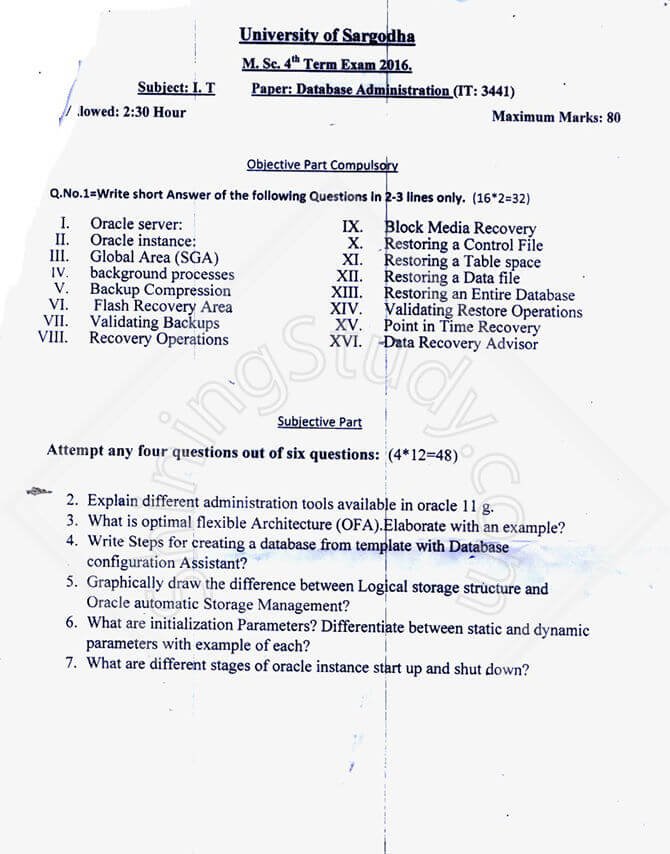
Read and download Database Administration and Management MSc IT 4th 2016
Database Administration Past Paper 2016 (text version)
University of Sargodha – M.Sc. 4th Term Exam 2016, I.T
Paper: Data Base Administration (IT-3441) · Time: 2:30 Hours · Maximum marks: 80
Note: Objective part is compulsory. Attempt any four questions from subjective part.
Objective part (compulsory) (16*2)
- Role
- Backup
- Import Utility
- Offline Backups
- Data base triggers
- Oracle managed files (OMF)
- Online Backups
- RMAN
- Security Capabilities
- Privileges
- Auditing
- Fine-grained Auditing
- Virtual Private Database
- Label Security
- Real Application Clusters
- Oracle Streams
Subjective part (4*12)
- Q.2 Explain different memory structures available in oracle server.
- Q.3 Explain mandatory background process in oracle server.
- Q.4 Briefly describe components of oracle server.
- Q.5 What is recovery, write steps for recovering instance, data file and control file?
- Q.6 What is database backup? Elaborate different types and strategy of backup?
- Q.7 Write steps for recovering redo log files and Control file.
Solved answers – Database Administration 2016
Short questions
- Role: a named group of privileges that can be granted to users or other roles, making privilege management easier – e.g.
CREATE ROLE clerk; GRANT SELECT ON emp TO clerk; GRANT clerk TO ali;Built-in roles include CONNECT, RESOURCE and DBA. - Backup: a copy of database data (datafiles, control files, archived redo logs, SPFILE) kept so the database can be restored and recovered after media failure, user error or corruption. Backups are physical (RMAN, OS copies) or logical (Data Pump export).
- Import utility: a logical-backup tool that reads a dump file created by Export and loads its objects and rows into a database. In 10g and later it is Data Pump Import (
impdp), e.g.impdp hr/pw DIRECTORY=dp_dir DUMPFILE=hr.dmp. - Offline (cold/consistent) backup: taken after a clean shutdown (SHUTDOWN NORMAL/IMMEDIATE/TRANSACTIONAL) by copying all datafiles, control files and redo logs. The database is unavailable during the backup, but the backup is consistent and can be restored without recovery.
- Database trigger: a stored PL/SQL block that runs automatically when an event occurs – DML on a table (INSERT/UPDATE/DELETE), DDL, or database events such as LOGON, STARTUP and SHUTDOWN. Used for auditing, enforcing complex rules and deriving values.
- Oracle Managed Files (OMF): Oracle automatically creates, names and deletes operating-system files for datafiles, tempfiles, redo logs and control files in locations set by
DB_CREATE_FILE_DESTandDB_CREATE_ONLINE_LOG_DEST_n, so the DBA does not specify file names. - Online (hot/inconsistent) backup: taken while the database is open and in use. It requires ARCHIVELOG mode; the backup is inconsistent and archived redo logs are applied during recovery to make it consistent. Taken with RMAN or
ALTER TABLESPACE … BEGIN/END BACKUP. - RMAN (Recovery Manager): Oracle’s built-in tool for backup, restore and recovery. It takes block-level, incremental and compressed backups, validates blocks for corruption, tracks backups in the control file or a recovery catalog, and automates recovery, e.g.
RMAN> BACKUP DATABASE PLUS ARCHIVELOG; - Security capabilities: Oracle protects data through user authentication (passwords, OS, Kerberos), privileges and roles, profiles (password and resource limits), auditing, Virtual Private Database, Label Security, encryption (TDE, network encryption) and Database Vault.
- Privileges: rights to run SQL or access objects. System privileges allow actions such as CREATE TABLE or CREATE SESSION; object privileges allow actions on a specific object, e.g. SELECT ON hr.emp. Granted with GRANT and removed with REVOKE.
- Auditing: monitoring and recording selected database actions (logons, statements, privilege use, object access) in the audit trail –
AUDIT_TRAILparameter, DBA_AUDIT_TRAIL – to detect misuse and support accountability. - Fine-grained auditing (FGA): audits access based on content, e.g. only SELECTs on salary where salary > 100000, using
DBMS_FGA.ADD_POLICY; records the exact SQL and bind values. - Virtual Private Database (VPD): row-level security – a policy function (DBMS_RLS) automatically adds a WHERE predicate to queries so each user sees only the rows they are allowed to see.
- Oracle Label Security: controls row access by data labels (levels, compartments, groups) compared with user clearance labels – used for multi-level classified data.
- Real Application Clusters (RAC): several instances on different servers open the same shared database at once, giving high availability and scalability; Cache Fusion keeps their buffer caches coherent.
- Oracle Streams: a feature for propagating and sharing data and events between databases using capture, staging (queues) and apply processes – used for replication and messaging (replaced by GoldenGate in newer releases).
Subjective questions
Q.2
Oracle memory structures:
- SGA (System Global Area) – shared by all processes: database buffer cache (copies of data blocks read from datafiles), shared pool (library cache with parsed SQL and PL/SQL; data dictionary cache), redo log buffer (change records waiting to be written by LGWR), large pool (RMAN, shared-server and parallel-query memory), Java pool, Streams pool, plus the fixed SGA.
- PGA (Program Global Area) – private memory for each server/background process: sort area, hash area, session information and cursor state.
- Software code areas – memory holding the Oracle executable code.
In 11g, Automatic Memory Management (MEMORY_TARGET) can size the SGA and PGA automatically.
Q.3
Mandatory background processes:
- DBWn (Database Writer): writes dirty buffers from the buffer cache to datafiles (at checkpoints, when free buffers are needed).
- LGWR (Log Writer): writes the redo log buffer to the online redo log files – at commit, every 3 seconds and when the buffer is one-third full.
- CKPT (Checkpoint): signals DBWn at checkpoints and updates datafile headers and the control file with checkpoint information.
- SMON (System Monitor): performs instance recovery at startup, cleans up temporary segments and coalesces free space.
- PMON (Process Monitor): cleans up after failed user processes – rolls back their transactions, releases locks and resources, and registers services with the listener.
Optional/other: ARCn (archiver – copies filled redo logs in ARCHIVELOG mode), RECO (resolves failed distributed transactions), MMON/MMNL (AWR statistics), Dnnn/Snnn (shared server dispatchers and servers), CJQ0 (job queue).
Q.4
Components of Oracle server: an Oracle server = Oracle instance + Oracle database.
- Instance – memory: the SGA (shared pool with library and data-dictionary cache, database buffer cache, redo log buffer, large pool, Java pool, Streams pool) and the PGA for each server process.
- Instance – background processes: DBWn, LGWR, CKPT, SMON, PMON, ARCn, RECO, MMON and others.
- Database – physical files: datafiles (data), control files (database structure and status), online redo log files (all changes); plus parameter file (SPFILE/PFILE), password file, archived logs and alert/trace files.
- Logical structure: tablespaces → segments → extents → data blocks.
- Processes for users: user process (client) and server process (dedicated or shared) that does the work on the user’s behalf; the listener accepts network connections.
Q.5
Recovery restores the database to a consistent, usable state after a failure by restoring backups and applying redo (roll forward) and undo (roll back).
- Instance recovery (after a crash or SHUTDOWN ABORT) is automatic: just
STARTUP. SMON rolls forward the online redo logs from the last checkpoint and rolls back uncommitted transactions using undo. - Datafile recovery (ARCHIVELOG mode): take the file offline –
ALTER DATABASE DATAFILE 5 OFFLINE;– then in RMANRESTORE DATAFILE 5; RECOVER DATAFILE 5;and bring it online withALTER DATABASE DATAFILE 5 ONLINE;(for SYSTEM/UNDO files, do this in MOUNT state). - Control file recovery: if one multiplexed copy is lost, shut down, copy a surviving copy over it (or edit CONTROL_FILES) and start up. If all are lost:
STARTUP NOMOUNT; RESTORE CONTROLFILE FROM AUTOBACKUP; ALTER DATABASE MOUNT; RECOVER DATABASE; ALTER DATABASE OPEN RESETLOGS;(or recreate it with CREATE CONTROLFILE from a trace backup).
Q.6
Database backup is a copy of the database used to reconstruct it after loss. Types:
- Physical vs logical: copies of datafiles, control files and archived logs (RMAN, user-managed) vs export of objects and rows (Data Pump).
- Consistent (offline/cold) vs inconsistent (online/hot): taken after a clean shutdown vs while open in ARCHIVELOG mode.
- Whole vs partial: entire database vs selected tablespaces or datafiles.
- Full vs incremental: every used block vs only blocks changed since a previous backup – level 0 (base) and level 1 (differential or cumulative).
- Backup sets vs image copies in RMAN.
Strategy: run in ARCHIVELOG mode; take a weekly level 0 and daily level 1 incremental backups; back up archived logs and an autobackup of the control file and SPFILE; keep backups in the Fast Recovery Area and on separate media/off-site; set a retention policy; multiplex control files and redo logs; and regularly test restores with RESTORE … VALIDATE.
Q.7
Recovering online redo log files:
- One member of a multiplexed group lost: the instance keeps running; drop and re-add the member:
ALTER DATABASE DROP LOGFILE MEMBER '/u01/redo01b.log'; ALTER DATABASE ADD LOGFILE MEMBER '/u01/redo01b.log' TO GROUP 1; - Whole INACTIVE group lost:
ALTER DATABASE CLEAR LOGFILE GROUP 2;(use CLEAR UNARCHIVED LOGFILE if it was not archived, then take a new full backup). - CURRENT or ACTIVE group lost: restore the database and perform incomplete recovery up to the last available log:
RESTORE DATABASE; RECOVER DATABASE UNTIL CANCEL; ALTER DATABASE OPEN RESETLOGS;
Recovering the control file: if one copy is lost, copy a good multiplexed copy over it and restart. If all are lost: STARTUP NOMOUNT; → RESTORE CONTROLFILE FROM AUTOBACKUP; → ALTER DATABASE MOUNT; → RECOVER DATABASE; → ALTER DATABASE OPEN RESETLOGS; Alternatively recreate it with the script from ALTER DATABASE BACKUP CONTROLFILE TO TRACE.
Answers prepared by Shining Study for revision. Check them against your class notes and teacher’s guidance.