
Blog
Mobile Application Development BSCS Term 7th Past Paper 2019 UOS
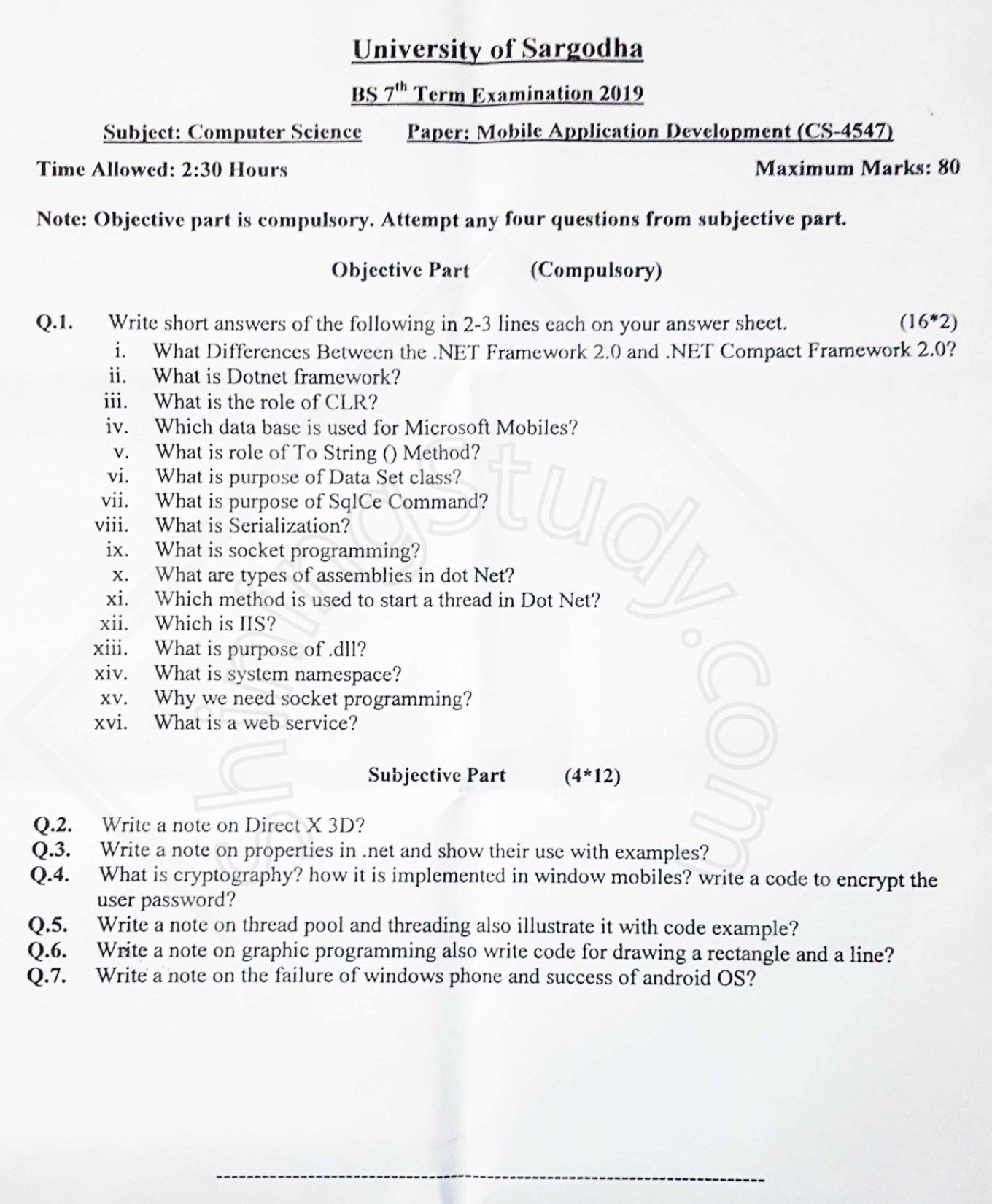
University of Sargodha
BS 7th Term Examination 2019
Subject: Computer Science
Paper: Mobile Application Development (CS-4547)
Time Allowed: 2:30 Hours
Maximum Marks: 80
Objective Part (Compulsory)
Q.1. Write short answers of the following in 2-3 lines each on your answer sheet. (16*2)
i. What Differences Between the .NET Framework 2.0 and .NET Compact Framework 2.0?
ii. What is Dotnet framework?
iii. What is the role of CLR?
iv. Which data base is used for Microsoft Mobiles?
v. What is role of ToString() Method?
vi. What is purpose of Data Set class?
vii. What is purpose of SQLCe Command?
viii. What is Serialization?
ix. What is socket programming?
x. What are types of assemblies in dot Net?
xi. Which method is used to start a thread in Dot Net?
xii. Which is IIS?
xiii. What is purpose of .dll?
xiv. What is system namespace?
xv. Why we need socket programming?
xvi. What is a web service?
Subjective Part (4*12)
Q.2. Write a note on Direct X 3D?
Q.3. Write a note on properties in .net and show their use with examples?
Q.4. What is cryptography? How is it implemented in window mobiles? Write a code to encrypt the user password?
Q.5. Write a note on thread pool and threading also illustrate it with a code example?
Q.6. Write a note on graphic programming also write code for drawing a rectangle and a line?
Q.7. Write a note on the failure of windows phone and success of android OS?
Solved answers
This course uses C# with the .NET Compact Framework for Windows Mobile; code below is C#.
Q1 – Short questions
(i) .NET Framework 2.0 vs .NET Compact Framework 2.0: the Compact Framework (CF) is a subset (~30% of classes) designed for Windows CE/Windows Mobile devices: smaller footprint, limited memory and CPU; it lacks ASP.NET, remoting, full reflection-emit, many WinForms controls and some XML/security features, but adds device-specific classes (SQL Server CE, infrared, Microsoft.WindowsMobile namespaces).
(ii) .NET Framework: Microsoft’s software platform for building and running applications – it provides the Common Language Runtime (CLR) and a large Base Class Library (BCL), supporting many languages (C#, VB.NET) that compile to MSIL.
(iii) Role of the CLR: the execution engine of .NET – loads assemblies, JIT-compiles MSIL to native code, manages memory with garbage collection, enforces type safety and code-access security, handles exceptions and threads.
(iv) Database for Microsoft mobiles: SQL Server Compact Edition (SQL Server CE / Mobile), a lightweight embedded database stored as a .sdf file; it can synchronise with SQL Server via merge replication or RDA.
(v) ToString(): a method inherited from System.Object that returns a string representation of an object; it can be overridden to return meaningful text, e.g. 5.ToString() → “5”.
(vi) DataSet class: an in-memory, disconnected cache of data containing DataTables, rows, columns and relations; it lets an application work with data offline and later update the database via a DataAdapter.
(vii) SqlCeCommand: represents an SQL statement executed against a SQL Server CE database – ExecuteNonQuery() for INSERT/UPDATE/DELETE, ExecuteReader() for SELECT, ExecuteScalar() for single values.
(viii) Serialization: converting an object’s state into a stream of bytes or XML/JSON so it can be stored or transmitted, and recreated later by deserialization (e.g. XmlSerializer).
(ix)/(xv) Socket programming and why we need it: writing programs that communicate over a network using sockets – endpoints (IP address + port) using TCP or UDP (System.Net.Sockets: Socket, TcpClient, TcpListener). It is needed for low-level, real-time, custom-protocol communication between devices and servers – chat, games, data sync – where higher-level services (HTTP) are not suitable.
(x) Types of assemblies: private assemblies (used by one application, in its folder), shared/public assemblies (strong-named, installed in the Global Assembly Cache), and satellite assemblies (resources for localisation). Also single-file vs multi-file; EXE vs DLL.
(xi) Starting a thread: create a Thread object with a ThreadStart delegate and call its Start() method: Thread t = new Thread(new ThreadStart(Work)); t.Start();
(xii) IIS: Internet Information Services – Microsoft’s web server for Windows, which hosts websites, ASP.NET applications and web services over HTTP/HTTPS/FTP.
(xiii) Purpose of a .dll: a Dynamic Link Library contains reusable code and resources that several programs can load and share at run time, saving memory and allowing modular updates; in .NET a class-library assembly is a DLL.
(xiv) System namespace: the root namespace of the .NET class library containing fundamental types – Object, String, Int32, Math, Console, Exception, DateTime, EventArgs – and parent of namespaces like System.IO and System.Data.
(xvi) Web service: a software component accessible over the web through standard protocols (HTTP, XML/SOAP, WSDL, or REST/JSON) that lets applications on different platforms exchange data – e.g. a mobile app calling a server’s .asmx service to fetch prices.
Q2 – DirectX 3D (Direct3D)
Direct3D is the 3D graphics API of Microsoft DirectX; on Windows Mobile 5/6 it was available as Direct3D Mobile, accessed from .NET CF through Microsoft.WindowsMobile.DirectX.Direct3D. It gives hardware-accelerated rendering of 3D scenes for games and visualisation.
- Device – the main object representing the graphics adapter; created with PresentParameters (windowed, swap effect).
- Vertices and vertex buffers – points with position, colour, normals, texture coordinates (CustomVertex types) stored in buffers; primitives such as triangle lists/strips.
- Transformations – world, view (camera) and projection matrices position the objects, the camera and the perspective.
- Rendering pipeline – transform and lighting, rasterisation, texturing, depth (Z) buffering, then present to the screen.
- Lights and materials, textures and meshes (loaded models).
- Render loop – Clear → BeginScene → set states and draw primitives → EndScene → Present, repeated each frame.
device.Clear(ClearFlags.Target | ClearFlags.ZBuffer, Color.Black, 1.0f, 0);
device.BeginScene();
device.SetStreamSource(0, vertexBuffer, 0);
device.DrawPrimitives(PrimitiveType.TriangleList, 0, 1);   // draw one triangle
device.EndScene();
device.Present();
Applications: mobile games, 3D maps, simulations. Limitations on mobile: low memory, fixed-function pipeline, battery use; it has been superseded by DirectX 11/12 on Windows and by OpenGL ES/Vulkan on Android.
Q3 – Properties in .NET
A property is a class member that provides controlled access to a private field through get and set accessors, while being used like a field. Properties support encapsulation – validation, read-only or write-only access, computed values – and are used by data binding and designers.
public class Student
{
    private string name;          // backing field
    private int marks;

    public string Name            // read-write property
    {
        get { return name; }
        set { name = value; }
    }

    public int Marks              // property with validation
    {
        get { return marks; }
        set
        {
            if (value < 0 || value > 100)
                throw new ArgumentOutOfRangeException("Marks must be 0-100");
            marks = value;
        }
    }

    public string Grade           // read-only computed property
    {
        get { return marks >= 50 ? "Pass" : "Fail"; }
    }

    public int RollNo { get; set; }   // auto-implemented property (C# 3.0)
}

// Use
Student s = new Student();
s.Name = "Ali";          // calls set
s.Marks = 78;
MessageBox.Show(s.Name + " - " + s.Grade);   // calls get -> "Ali - Pass"
Kinds: read-write, read-only (get only), write-only (set only), static properties, auto-implemented properties and indexers (this[int i]). Controls in Windows Forms expose properties such as Text, Width, Enabled.
Q4 – Cryptography on Windows Mobile
Cryptography is the practice of securing data by transforming it (encryption, hashing, signatures) so that only authorised parties can read or verify it – providing confidentiality, integrity and authentication.
Implementation on Windows Mobile: the OS provides the CryptoAPI (Cryptographic Service Providers – RSA, AES, 3DES, SHA, RC4), and the .NET Compact Framework (2.0+) wraps it in System.Security.Cryptography – symmetric classes (TripleDESCryptoServiceProvider, RijndaelManaged/AES), asymmetric RSACryptoServiceProvider, hashing (SHA1Managed, SHA256Managed, MD5) and RNGCryptoServiceProvider. Also SSL/TLS for HTTPS, device storage card encryption, and certificates. Passwords should be stored as salted hashes, not reversible encryption.
using System;
using System.Text;
using System.Security.Cryptography;

public static class PasswordHelper
{
    // Hash a password with a random salt (store salt + hash)
    public static string HashPassword(string password, out string salt)
    {
        byte[] saltBytes = new byte[16];
        new RNGCryptoServiceProvider().GetBytes(saltBytes);
        salt = Convert.ToBase64String(saltBytes);

        byte[] data = Encoding.UTF8.GetBytes(salt + password);
        SHA256Managed sha = new SHA256Managed();
        byte[] hash = sha.ComputeHash(data);
        return Convert.ToBase64String(hash);
    }

    public static bool Verify(string password, string salt, string storedHash)
    {
        byte[] data = Encoding.UTF8.GetBytes(salt + password);
        string hash = Convert.ToBase64String(new SHA256Managed().ComputeHash(data));
        return hash == storedHash;
    }

    // Reversible encryption with TripleDES (if encryption is required)
    public static byte[] Encrypt(string plain, byte[] key, byte[] iv)
    {
        TripleDESCryptoServiceProvider des = new TripleDESCryptoServiceProvider();
        ICryptoTransform enc = des.CreateEncryptor(key, iv);
        byte[] input = Encoding.UTF8.GetBytes(plain);
        return enc.TransformFinalBlock(input, 0, input.Length);
    }
}

// Usage
string salt;
string hash = PasswordHelper.HashPassword(txtPassword.Text, out salt);
// save salt and hash in the SQL CE database
Q5 – Threading and the thread pool
A thread is an independent path of execution within a process. Multithreading keeps the UI responsive on mobile devices by moving long tasks (network calls, database work) to background threads. Namespace: System.Threading. Key members: Thread.Start(), Thread.Sleep(), Join(), Priority, IsBackground; synchronization with lock, Monitor, Mutex, AutoResetEvent. UI controls must be updated only from the UI thread using Control.Invoke.
The thread pool is a collection of worker threads managed by the CLR. Instead of creating and destroying threads for each short task (costly on a device), work items are queued with ThreadPool.QueueUserWorkItem; a free pool thread runs them and then returns to the pool. Advantages: less overhead, limited number of threads, automatic management. Limitations: no direct control over priority, can’t easily abort/join; not suitable for long-running tasks.
using System;
using System.Threading;
using System.Windows.Forms;

public partial class MainForm : Form
{
    // 1. Dedicated thread
    private void btnStart_Click(object sender, EventArgs e)
    {
        Thread worker = new Thread(new ThreadStart(DownloadData));
        worker.IsBackground = true;
        worker.Start();
    }

    private void DownloadData()
    {
        Thread.Sleep(3000);                       // simulate long work
        this.Invoke(new EventHandler(UpdateUI));  // back to UI thread
    }

    private void UpdateUI(object sender, EventArgs e)
    {
        lblStatus.Text = "Download complete";
    }

    // 2. Thread pool
    private void btnPool_Click(object sender, EventArgs e)
    {
        for (int i = 1; i <= 3; i++)
            ThreadPool.QueueUserWorkItem(new WaitCallback(Task), i);
    }

    private void Task(object state)
    {
        int id = (int)state;
        Thread.Sleep(1000);
        // process item 'id' on a pool thread
    }
}
Q6 – Graphics programming
Graphics in .NET (and .NET CF) use GDI+ through System.Drawing. The Graphics object represents a drawing surface (form, control or bitmap). Tools: Pen (lines and outlines, colour and width), Brush/SolidBrush (filling shapes), Font (text), Color, Point, Rectangle, Bitmap/Image. Methods: DrawLine, DrawRectangle, FillRectangle, DrawEllipse, DrawPolygon, DrawString, DrawImage. Drawing is usually done in the Paint event (OnPaint override) so it is redrawn whenever the form is invalidated; double buffering (drawing on an off-screen bitmap first) avoids flicker. On Windows Mobile the CF supports a subset of GDI (e.g. pen width 1, no anti-aliasing); Direct3D Mobile is used for advanced 3D.
using System.Drawing;
using System.Windows.Forms;

public class DrawForm : Form
{
    protected override void OnPaint(PaintEventArgs e)
    {
        Graphics g = e.Graphics;

        // Draw a line from (10,10) to (200,10)
        Pen bluePen = new Pen(Color.Blue);
        g.DrawLine(bluePen, 10, 10, 200, 10);

        // Draw a rectangle at (20,40), width 150, height 80
        Pen redPen = new Pen(Color.Red);
        g.DrawRectangle(redPen, 20, 40, 150, 80);

        // Filled rectangle and text
        SolidBrush brush = new SolidBrush(Color.LightGreen);
        g.FillRectangle(brush, 30, 140, 100, 50);
        g.DrawString("Shining Study", this.Font, new SolidBrush(Color.Black), 30, 200);

        bluePen.Dispose(); redPen.Dispose(); brush.Dispose();
        base.OnPaint(e);
    }
}
Q7 – Failure of Windows Phone and success of Android
Why Windows Phone failed (Windows Mobile → Windows Phone 7/8/10 Mobile, discontinued 2017–2019):
- Late entry – launched in 2010, after iPhone (2007) and Android (2008) had captured users and developers.
- App gap – few developers built apps for its small market share, and the lack of popular apps (Snapchat, banking apps, later even Google apps like YouTube) kept users away – a vicious circle.
- Broken compatibility – WP7 apps/devices couldn’t upgrade to WP8, and WP8 phones couldn’t all move to Windows 10 Mobile, frustrating users and developers; Windows Mobile 6 apps didn’t run on WP7.
- Strategy changes – repeated platform resets, the costly Nokia acquisition (2013) then write-off.
- Limited hardware/OEM support and carrier promotion; licence fees at first, while Android was free.
Why Android succeeded:
- Open source and free (AOSP) – any manufacturer (Samsung, Huawei, Xiaomi, local brands) could use and customise it, leading to devices at every price point, especially cheap phones in developing markets like Pakistan.
- Google ecosystem – Gmail, Maps, YouTube, Play Store and services integrated.
- Huge app ecosystem – Java/Kotlin development, cheap developer registration, easy publishing on Google Play.
- Customisation and choice – widgets, launchers, hardware variety.
- Open Handset Alliance partnerships with carriers and manufacturers; rapid innovation and frequent updates.
Result: Android holds over 70% of global smartphone share, while Windows Phone never exceeded a few percent. Lesson: platform success depends on ecosystem, developers and backward compatibility as much as on technology.
Answers prepared by Shining Study for revision. Check them against your class notes and teacher’s guidance.